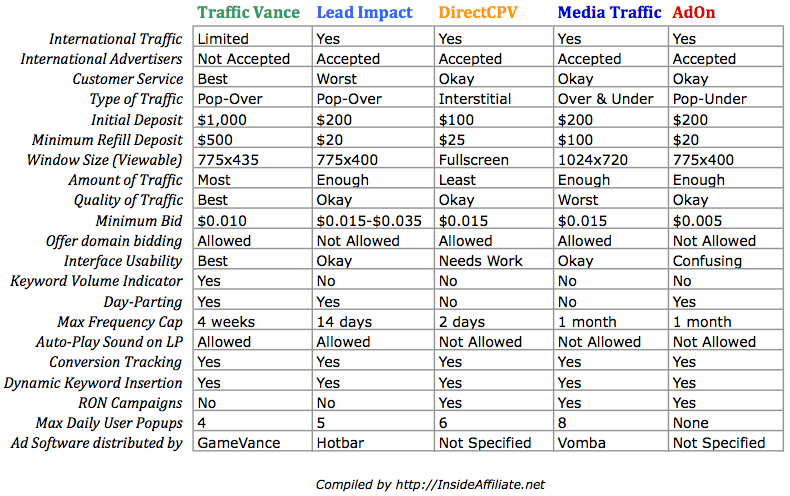
If you’ve read my other posts on PPV, you know I’m a fan of Media Traffic and their PPV network. This is the place that 90% of the people I talk to start out with PPV. That being said, there are other options out there. A newer network that I heard about recently is DirectCPV. Since I had a few people asking me about it, I decided to give it a test run to see how it stacks up to the other guys.
First of all, the interface may look familiar to you when you log in and setup a campaign. This is due to the fact that DirectCPV is white labeling the CPView platform. This does not mean that DirectCPV is the same thing as CPView, they have a different user base with the adware installed so it is a completely different network.
It is relatively simple to get a campaign set up with the interface, you put in your Landing Page url (affiliate link), give it a name, and then you add in at least one type of targeting (URL, keyword, or category). I put in about 20 URLs from a quick Google search and decided to try out a couple keywords as well. One thing to note here is that DirectCPV does not have anywhere near the number of adware users that some of the bigger networks have, so you might be a bit safer testing out new keywords here (keywords on the big networks can mean your whole budget gone in the blink of an eye).

I let it run for a few days and when I came back to check my stats (using Prosper202) I was pleasantly surprised that my campaign was profitable right off the bat. It wasn’t a home run, but it did make money. I decided to make a couple of minor tweaks at that point. The first thing was checkout my Prosper202 to see what URLs were converting. As is often the case, all the conversions were coming from one URL. I noticed that some of them were coming from the Keyword that I had put in instead of the direct URL. The problem with that is that the bid price for the Keyword was 0.08 (8 cents) and the bid for the direct URL was 0.01 (1 cent). Simple fix there, I paused the Keyword and added the URL to my targeting. After that the profits were decent.
The main gripe I have about the DirectCPV interface is that you have to click “Check Bid” on each URL individually to see if you are in 1st position. Other networks have done this better, but you can take some of the hassle out of it by setting the bid mode to Auto and then setting it at 1st position. This will automatically increase your bid if somebody is above you. Also if you want to Geo Target your campaign, you have to do it after the campaign is setup, you can’t do it during the campaign creation. This stumped me the first time.
Final word? I like DirectCPV. I think it’s worth a shot especially if you have a profitable campaign on another network that you are looking to expand. It can also be good for testing out a new campaign to if it converts without blowing your budget since there is a smaller installed user base, there is less competition, and the bid prices start at 1 penny (at MT it is 1.5). It doesn’t have as much traffic as the bigger guys, but from what I saw it can definitely be a good source to add to your repertoire.
If you signup through my affiliate link here you can get a $25 credit by using the promo code “BR25”.
Disclosure: http://cmp.ly/5